


SoundHound - Music Discovery
3.659.28K Reviews
App Specs
- Version
- 10.5.8
- Updated On
- License
- Free
- Downloads
- 100,000,000+
- Developer
- SoundHound Inc.
- Categories
- Music & Audio
- Platform
- Android, iOS
Screenshots

 Analysis by AppCompare
I tend to reach for a music-identification app in a very particular moment: a song catches my ear, but I have no lyrics or artist name to search. SoundHound is built for that gap between hearing something and knowing what to do with it. It is a music and audio app from SoundHound Inc., and its appeal is not only naming a track; it also gives you ways to follow the discovery through lyrics, listening and playlists.
A useful starting point when a tune gets stuck in your head
The most distinctive reason I would try this app is that the song does not always have to be playing nearby. If a melody is all you remember, humming or singing it gives you another route to identification. That can be more useful than a lyric search when you only recall the shape of the chorus, or when the music was playing too loudly to catch the words. It is not a guarantee for every half-remembered tune, but it makes the app more than a microphone pointed at a speaker.
For a practical test, I would start with the clearest version of the musical clue I have: hum the main melody rather than a complicated run of notes, and try again if the first attempt brings back no convincing match. A noisy room, a very short fragment or a tune sung far from its original pitch can all make recognition harder. I like having both options—listen to the song or supply the tune myself—because they solve different problems.
From recognition to a listening session
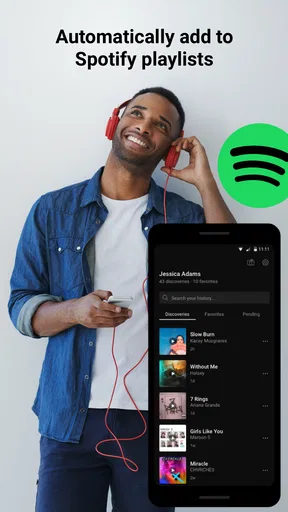
Once the app identifies a track, the useful next step is deciding what to do with it. You can follow lyrics as the song plays, look back at your discovery history, and connect with Spotify or Apple Music to add tracks to playlists. That gives a casual “what was that song?” moment a simple path toward listening again later. The history is especially handy if I recognize several songs while out and do not want to interrupt each conversation to build a playlist on the spot.
Those links to other music services are a handoff rather than a replacement for them. I would use SoundHound to identify or investigate a track, then move into the service where I already keep my library and playlists. If all you want is a broad catalog browser or careful playlist editing, your preferred streaming app remains the better place to spend time. The strength here is connecting discovery with that existing routine, not asking you to rebuild it.
Voice control is useful, with a sensible trade-off
The voice-controlled player can make music requests feel natural when your hands are occupied. The app’s voice assistant can respond to requests about songs and artists as well as music discovery, so it can be a convenient way to move from a question to listening. I would still use it thoughtfully: a spoken request is not always practical in a quiet public place, and while driving the priority should be keeping attention on the road rather than exploring menus or correcting a misheard command.
Voice control works best when I know what I want to ask and can phrase it clearly. For an exact track, artist or genre request, speaking can save a few taps; for a vague mood or a complex listening plan, browsing manually gives me more control. That distinction matters if you are deciding whether this can replace your regular player. I see it as a helpful extra way to interact, not a reason to give up the controls and recommendations you already rely on.
Worth Reading Before You Choose

Flipboard Shows What News Apps Must Do Beyond the Feed

Switching to Android Auto Means Rethinking Your Driving Routine

Google Calendar Makes a Crowded Week Easier to Manage

Ludo King Makes the Most of the Minutes Between Plans

Baby Panda World Brings Quick Play to Modern Phones, but Its Game Library Feels Busy

ESPN’s Live Game View Makes Following Close Games Easier
Who will get the most from it
I would recommend it to people who often hear unfamiliar music in cafés, shops, at gatherings or on television, and to anyone who enjoys tracking down a tune they can only hum. It is also a good fit for listeners who like to check lyrics while listening and save discoveries into an existing Spotify or Apple Music routine. If you rarely wonder what is playing and prefer to search for music by album or artist, you may not need a dedicated recognition app on your home screen.
Compared with searching the web by remembered lyrics, SoundHound can be a better first move when the words are unclear or absent. Compared with asking a general voice assistant to identify a song, its focus on music discovery and its humming option make it a more purpose-built choice for this particular job. A streaming app is still better for organizing a large collection, while a general search is often quicker if you already know a distinctive lyric. I would choose based on the clue I have, rather than expect one tool to handle every kind of music search equally well.
Everyday discoveries, and the details that matter
Picture leaving a café with a melody looping in your head and no idea what it was. You can try to identify it while it is still playing, then check the result and lyrics, or use the humming route later if the song has stopped. If you are in a hurry, save the discovery for another time and use the history to find it again. This is a small workflow, but it avoids the familiar frustration of remembering a tune and forgetting to search for it before the day moves on.
A helpful habit is to treat recognition as the beginning of a quick check, not as a reason to stop paying attention to the music around you. Confirm that the title and artist fit what you heard before sending the track to a playlist; a noisy recording or an indistinct snippet can make any identification tool less dependable. If your first attempt is unclear, try a cleaner portion of the song or hum the most memorable phrase. These small choices improve the odds without turning a spontaneous discovery into a chore.
The app is free to download, with in-app purchases ranging from $0.99 to $5.99 per item. It has a Teen content rating, and its current version is 10.5.6, with Android 8.0 as the minimum operating-system requirement. Its 3.7 average comes from around 919,000 ratings, and it has passed 100 million installs. Those figures suggest a widely used app, but the practical question is whether its particular mix of identification, lyrics and voice interaction suits your habits.
Where it fits among music tools
Music recognition is a narrow job, and that is both the point and the limitation. If your main need is to identify a song playing in the room, a recognition app is more direct than opening a streaming service and guessing at search terms. If you know the lyrics, a web search may be faster; if you want recommendations, album credits or long-term collection management, a streaming service is more capable. SoundHound makes the most sense when you want a bridge between hearing a track and deciding what to do with it.
I would not make it my only music app. Its value depends on how often you encounter music you cannot name and whether you will use the history, lyric view or voice controls after identification. People who mainly listen to saved albums may find those extras unnecessary, while curious listeners can get more out of them by treating each recognition as a bookmark for later. That is the real trade-off: a focused discovery tool can be convenient, but it cannot replace the broader organization and listening features of a dedicated music library.
Instant Music Recognition
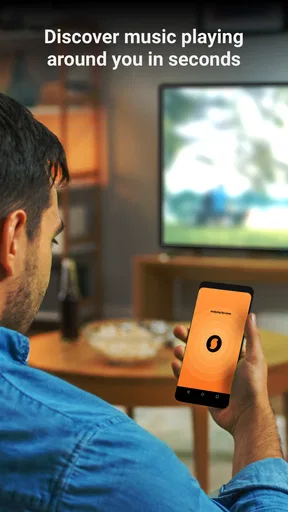
Imagine you’re in a café, and a catchy tune starts playing. Instead of frantically trying to Google the lyrics you barely caught, just fire up SoundHound with a simple tap. The app listens for a few seconds and, voilà, it tells you the song title, artist, and even the album. It’s like having a musical Sherlock Holmes in your pocket!
What I love most is how fast and accurate the app is. Whether it’s mainstream hits or lesser-known indie tracks, SoundHound rarely misses a beat. It’s like magic, really.
Features You’ll Love
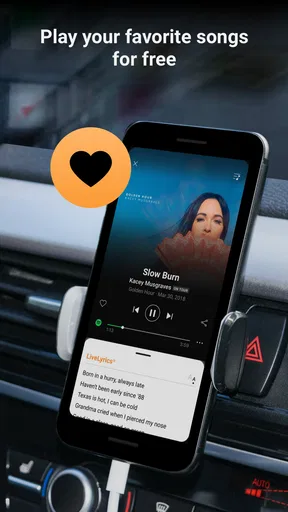
Aside from its core feature of recognizing music, SoundHound comes loaded with other goodies. You can explore lyrics in real-time while the song plays, which is perfect for those of us who love a good sing-along. Plus, there’s a nifty feature that shows the song’s history, so you can revisit your musical discoveries anytime.
The app also integrates seamlessly with Spotify and Apple Music, making it super easy to add newly discovered tracks to your playlists. Just a couple of taps, and you’re all set to groove to your new favorite tunes.
Voice-Controlled Awesomeness
Now, let’s talk about Houndify. This voice assistant is like Siri, but cooler—at least when it comes to music. You can literally say, "Hey, SoundHound, what’s this song?" and it gets to work. It’s hands-free and works like a charm, especially when you’re driving or busy with something else.
Beyond song identification, you can ask it to play specific tracks, find out more about an artist, or even explore music by genre. It’s like having your personal DJ ready to cater to your every musical whim.
Design and User Experience
The user interface is sleek and intuitive. I found it incredibly easy to navigate, and everything you need is just a tap away. The dark theme is easy on the eyes, which is a big plus for late-night music sessions.
The app’s performance is top-notch, with no noticeable lag or crashes during my tests. It’s available for both Android and iOS, so no matter your device, you’re covered.
The Social Element
If you’re into sharing your musical taste, SoundHound makes it easy to share your discoveries on social media. Whether it’s a new song that’s stuck in your head or an old favorite you’ve rediscovered, sharing is just a click away.
There’s also a community vibe within the app, where you can see what’s trending or what your friends are discovering. It’s a fun way to stay connected and keep your playlists fresh.
Final Thoughts
In a world overflowing with music, SoundHound is the compass that helps you navigate through the noise. It’s efficient, packed with features, and genuinely fun to use. Whether you’re an avid music lover or just someone who occasionally wonders, "What’s that song?" this app is a must-have.
So, next time you hear a song you can’t place, give SoundHound a try. You might just discover your new favorite track, and who knows, maybe even impress your friends with your newfound musical knowledge.
A final practical note
For me, the strongest reason to keep SoundHound around is that it turns a fleeting musical clue into something I can revisit, rather than leaving me to hope I remember it later. The app is free, although optional in-app purchases range from $0.99 to $5.99 per item, so I would begin with the free experience and see whether recognition, lyrics and history become part of my routine before spending anything.
It was released on June 15, 2010, and the developer is SoundHound Inc. The app has a 3.7 average from around 919,000 ratings, alongside roughly 59,000 written reviews, and has been installed over 100 million times. I read that reach as evidence that many people find the basic idea useful, not as a promise that every match will be right in every environment. Recognition depends on the clue you can provide, so a clean snippet or a clear hum is still the best starting point.
Overall, I would keep it in mind for curious listeners who regularly ask “what is this song?” and want a quick route from recognition to a saved track. I would skip it if I wanted a complete music library, deep playlist controls or a recommendation engine as my main experience; those needs belong in a streaming app. For the narrower task of catching a song before it disappears from memory, SoundHound is a practical companion, especially when I remember the melody better than the words.
Pros
- Accurate song recognition capabilities.
- Quick and user-friendly interface.
- Includes lyrics for many songs.
- Hands-free voice search feature.
- Syncs with Spotify for playlists.
Cons
- Occasional ads can be intrusive.
- Limited offline functionality.
- Requires stable internet connection.
- Some features locked behind paywall.
- Not all songs have complete lyrics.
FAQs for SoundHound - Music Discovery
What is SoundHound and how does it work?
SoundHound is a music discovery app that allows users to identify songs playing around them. By simply tapping the orange button, the app listens to the music and provides details such as the song title, artist, and album. It also offers lyrics, artist bios, and the ability to stream songs through connected services.
Is SoundHound free to use, and are there any in-app purchases?
SoundHound offers a free version that includes basic song identification features. However, it also provides a paid version, SoundHound∞, which removes ads and provides additional features. Users can make in-app purchases for enhanced functionalities, such as unlimited music recognition and premium streaming options.
Which platforms are compatible with SoundHound?
SoundHound is available for both Android and iOS devices. It can be downloaded from the Google Play Store for Android users and the Apple App Store for iOS users. The app is designed to work seamlessly across smartphones and tablets, offering a consistent experience on different devices.
Does SoundHound require an internet connection to identify music?
SoundHound requires an internet connection to identify music tracks. When you tap to identify a song, the app sends an audio sample to its servers for processing. An active internet connection is necessary for accessing song details, lyrics, and streaming services, ensuring accurate and up-to-date information.
Can SoundHound connect with other music streaming services?
Yes, SoundHound can connect with various music streaming services, such as Spotify and Apple Music. This integration allows users to stream identified songs directly from their preferred platforms. Users can also create playlists and save their discoveries for easy access and listening later.


